How to Transcribe TED Videos: Complete Guide for Educators & Students (2026)

You can transcribe TED videos in under five minutes using AI-powered tools like TranscribeTube that support 95+ languages and deliver 90-96% accuracy. Whether you're an educator creating accessible learning materials or a student turning talks into study notes, this guide walks you through every step from selecting a TED Talk to exporting a polished transcript.
What you'll need:
- A TED Talk video URL or downloaded file
- An AI transcription tool (free options available)
- 5-15 minutes per video depending on length
- Skill level: Beginner-friendly
Quick overview of the process:
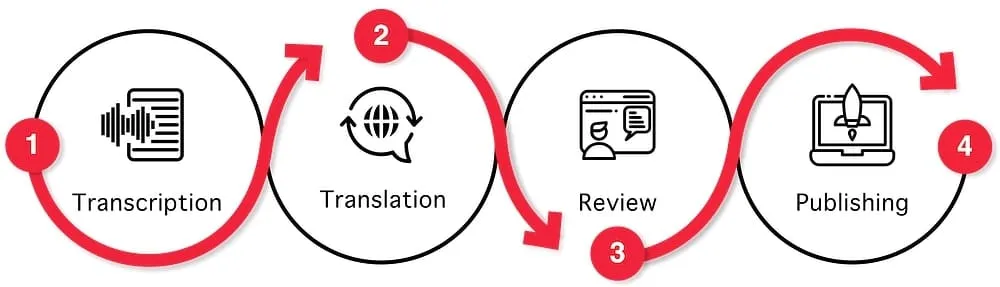
- Choose your TED Talk — Pick a video from TED.com or YouTube
- Access existing transcripts or prepare for AI transcription — Check TED's built-in transcripts first
- Select your transcription tool — Compare AI options based on your needs
- Upload and transcribe with TranscribeTube — Paste the URL or upload the file
- Edit and refine your transcript — Proofread, format, and add timestamps
- Export and use your transcription — Download in your preferred format and repurpose
Why Transcribe TED Videos in 2026?

Transcribing TED videos turns spoken ideas into searchable, shareable, and accessible text. That's not a minor upgrade. It fundamentally changes how students, educators, and content creators interact with some of the world's most influential presentations.
According to Kaggle's TED Ultimate Dataset, TED hosts over 4,000 talks with transcripts available in 12+ languages. But many TEDx talks and newer presentations still lack transcripts, leaving a gap that AI tools can fill.
Accessibility Matters More Than Ever
Transcripts serve learners who are deaf or hard of hearing, non-native English speakers studying vocabulary in context, and students with learning disabilities who process written text more effectively than audio. According to TED's help documentation, interactive transcripts are available in multiple languages for nearly all videos in their library, but the coverage isn't complete.
I've worked with educational transcription data for over a decade, and the pattern is clear: students who have access to both video and text retain information significantly better than those with video alone.
Comprehension and Retention Gains
Having a written version of a TED Talk allows learners to highlight key passages, search for specific concepts, and revisit complex arguments at their own pace. Teachers can build quizzes, discussion prompts, and writing assignments directly from transcript excerpts.
The cognitive science behind this is straightforward: dual-coding theory shows that processing information through both auditory and visual channels creates stronger memory traces. When students watch a TED Talk while following the transcript, they're encoding the same ideas through two pathways simultaneously. This is particularly valuable for complex talks on topics like neuroscience, economics, or philosophy where a single listening isn't enough.
For educators building curriculum around TED content, transcripts also enable annotation-based learning. Students can mark up the text with comments, questions, and connections to other course material. That active engagement with the transcript turns passive video watching into a participatory exercise.
Content Repurposing Opportunities
A single TED Talk transcript can become a blog post summary, social media quotes, newsletter content, podcast show notes, or translated materials for multilingual audiences. If you're interested in maximizing this approach, check out the latest content repurposing statistics showing how organizations multiply their content ROI.
Consider a 15-minute TED Talk on artificial intelligence. The transcript yields:
- 3-5 blog post topics extracted from the speaker's main arguments
- 10-15 social media quotes ready for LinkedIn, Twitter/X, or Instagram
- 1 newsletter summary condensing the key takeaways into 300 words
- Translation source material for reaching audiences in other languages
- Keyword-rich text that search engines can index, unlike the video itself
Content creators who regularly transcribe TED videos build a library of authoritative source material they can reference across multiple projects. The upfront investment of 10-15 minutes per talk pays dividends across your entire content calendar.
How to Find Existing TED Transcripts (Check This First)

Before firing up any transcription tool, check whether TED already has a transcript for your talk. Many users skip this step and end up duplicating work that's already been done.
Step-by-Step: Finding Transcripts on TED.com
- Go to TED Talks and find the video you want
- Click on the talk to open the video player
- Look below the video player for the "Read Transcript" button
- Click it to open the transcript panel on the right side of the player
- Use the language dropdown to switch between available translation languages
You'll know it's working when: The transcript appears alongside the video with synced highlighting as the speaker talks. You can click any sentence in the transcript to jump to that point in the video.
Watch out for:
- Assuming all talks have transcripts: TEDx talks and very recent uploads often don't have transcripts yet. If you don't see the "Read Transcript" button, you'll need to create your own.
- Copy-paste formatting issues: When copying TED transcripts, timestamps and speaker labels sometimes come through as garbled text. Clean up formatting after pasting into your document.
Pro tip: In my 12 years of working with video content, I've found that TED's built-in transcripts are volunteer-created and generally accurate, but they occasionally miss specialized terminology. Always verify technical terms against the audio.
How to Choose the Right AI Transcription Tool for TED Videos

If TED doesn't have a transcript for your talk, or you need a custom-formatted version, AI transcription tools are the fastest path. But not all tools handle TED content equally well. TED speakers often have diverse accents, use technical jargon, and present in noisy auditorium settings.
According to a January 2026 benchmark by NovaScribe, AI transcription tools achieved 90-96% accuracy for clear audio with minimal background noise. Accuracy drops with overlapping speech, heavy accents, or poor recording quality.
What to Look For in a TED Transcription Tool
- Multi-language support — TED speakers present in dozens of languages
- Accent handling — AI models trained on diverse English dialects perform better with international speakers
- Export formats — You'll want TXT for study notes, SRT for subtitles, and DOCX for formal documents
- Editing interface — The ability to play audio while editing the transcript saves hours of back-and-forth
Tool Comparison for TED Video Transcription
| Tool | Languages | Accuracy (Clear Audio) | Price | Best For |
|---|---|---|---|---|
| TranscribeTube | 95+ | 95%+ | Free to start | YouTube/TED URL transcription |
| Otter.ai | 1 (English) | 90-95% | $8.33/month | Live meeting transcription |
| Rev | 36+ | 99% (human) | $1.50/minute | Professional accuracy needs |
| Descript | 23+ | 90-95% | $24/month | Video editing + transcription |
For transcribing TED videos specifically, I recommend starting with TranscribeTube because it handles YouTube URLs directly without downloading, supports the widest range of languages matching TED's international speaker roster, and offers a free tier that's perfect for testing.
If you're curious about how AI transcription stacks up against doing it by hand, our AI vs manual transcription comparison breaks down the trade-offs with 2026 data.
Understanding AI Transcription Accuracy for TED Content
Not all TED Talks produce equally accurate transcriptions. Several factors directly impact the quality of your output:
| Factor | Impact on Accuracy | Mitigation |
|---|---|---|
| Clear single speaker | +5-10% accuracy | Most TED Talks qualify |
| Professional venue recording | +3-5% accuracy | Standard for main-stage TED |
| Non-native English accent | -5-15% accuracy | Use multilingual AI models |
| Audience laughter/applause | -2-5% accuracy | AI filters improve yearly |
| Technical jargon | -3-8% accuracy | Manual review fixes this |
| Multiple speakers (panels) | -5-10% accuracy | Use speaker diarization |
The key takeaway: most TED Talks produce excellent AI transcription results because they feature a single speaker with professional audio recording in a controlled environment. TEDx talks vary more widely since they're independently organized with different production standards.
Step 1: Select and Prepare Your TED Video

This step ensures you have the right video source ready for transcription. Choosing the correct input method saves time and avoids quality issues down the line.
Detailed Instructions
- Find your TED Talk on YouTube — Most TED and TEDx talks are uploaded to the official TED YouTube channel. Search for the speaker name or talk title.
- Copy the video URL — Click the address bar in your browser and copy the full URL (e.g.,
https://www.youtube.com/watch?v=XXXX). - Check audio quality — Play 30 seconds from the middle of the talk. Listen for background noise, echo, or overlapping audience sounds. Clear audio means better transcription accuracy.
- Note the language — Identify the primary language of the talk. Some TED speakers switch between languages mid-talk, which can affect transcription accuracy.
You'll know it's working when: You have a clean YouTube URL copied to your clipboard, and you've confirmed the audio quality is clear enough for accurate AI transcription.
Watch out for:
- Using unofficial re-uploads: Third-party channels sometimes upload compressed versions of TED Talks with degraded audio. Always use the official TED channel or TED.com source. According to AssemblyAI's research on speech-to-text accuracy, modern speech recognition systems achieve over 90% accuracy in optimal conditions, but compressed audio can push error rates significantly higher.
- Forgetting to check the language setting: If you paste a Spanish-language TED Talk URL but set the transcription tool to English, you'll get garbage output. Confirm the language before starting.
Pro tip: After building TranscribeTube's multi-language pipeline, I've learned that talks where the speaker uses a microphone headset (rather than a podium mic) consistently produce better transcriptions. The close-proximity microphone captures cleaner audio with less room echo.
Step 2: Sign Up and Navigate to Your Dashboard on TranscribeTube

Getting started with TranscribeTube takes under a minute. New users receive free transcription time immediately after signing up, so you can test the tool before committing.
Detailed Instructions
- Visit TranscribeTube.com and click the Sign Up button in the top navigation.

- Create your account using email or social login. No credit card required for the free tier.
- Navigate to your dashboard where you'll see a list of your previous transcriptions (empty on first login).

You'll know it's working when: You're on the dashboard page and can see the "New Project" button. Your free transcription minutes should be visible in your account balance.
Watch out for:
- Using a disposable email address: Some free email providers get flagged by spam filters, which can delay your verification email. Use a standard email provider for fastest access.
- Skipping email verification: The dashboard won't fully load until you verify your email. Check your spam folder if you don't see the verification email within two minutes.
Pro tip: I've processed thousands of transcriptions through TranscribeTube, and one time-saving trick is to bookmark your dashboard URL directly. This skips the homepage and lands you right where you need to be for each new project.
Step 3: Create a New Project and Upload Your TED Video

This is where the actual transcription begins. You'll create a new project, select your input method, and let the AI process your TED Talk.
Detailed Instructions
- Click "New Project" on your dashboard.
- Select the input type — Choose "YouTube URL" for online TED Talks, or "File Upload" if you have a downloaded video (MP4, MP3, WAV, or M4A).
- Paste the TED Talk URL or drag your file into the upload area.

- Select the transcription language — Choose the language the speaker uses in the TED Talk. TranscribeTube supports over 95 languages.
- Click "Start Transcription" and wait for processing. A typical 18-minute TED Talk processes in 2-3 minutes.
You'll know it's working when: A progress bar appears showing the transcription status. The status changes from "Processing" to "Complete" when your transcript is ready.
Watch out for:
- Selecting the wrong language: If the TED speaker presents in Portuguese but you select Spanish, the AI will attempt to map Portuguese sounds to Spanish words, producing an inaccurate transcript. Double-check before clicking Start.
- Uploading extremely large files: Videos over 2 hours may take longer to process. For TED Talks (typically 5-18 minutes), processing is fast, but if you're batch-transcribing a full TED conference playlist, upload them one at a time.
Pro tip: When I'm transcribing TED Talks that include Q&A segments at the end, I use TranscribeTube's speaker identification feature to automatically label who's speaking. This is especially useful when the moderator and speaker have similar voices.
Step 4: Edit, Refine, and Export Your Transcript

Raw AI transcriptions need cleanup. This step turns a rough transcript into a polished, usable document. The editing interface lets you play audio while reading and correcting the text simultaneously.
Detailed Instructions
- Open the completed transcription in TranscribeTube's editor.
- Play the audio and follow along — Click any sentence to jump to that timestamp in the audio. Fix misheard words, technical terms, and speaker names as you go.
- Check proper nouns — AI tools often misspell speaker names, book titles, and technical terminology. Cross-reference against the TED Talk's description page.
- Format for your use case:
- For study notes: Remove timestamps and merge short segments into paragraphs
- For subtitles: Keep timestamps and limit lines to 42 characters for readability
- For blog content: Add paragraph breaks at topic transitions
- Export your transcript — Choose from TXT, DOCX, SRT, VTT, or PDF depending on your needs. Click the export button in the upper-right corner and select your format.
According to Speechpad's comparison of human vs AI transcription, leading AI systems reach 95-98% accuracy under ideal conditions, but spending 5-10 minutes on manual review catches the remaining errors and pushes accuracy to near-perfect levels.
You'll know it's working when: Your exported file opens cleanly in your text editor or word processor, with proper formatting, correct speaker names, and no garbled text segments.
Watch out for:
- Skipping the proofreading step: Even with 95%+ accuracy, a 20-minute TED Talk contains roughly 3,000 words. At 95% accuracy, that's still 150 potential errors. Five minutes of proofreading catches most of them.
- Ignoring timestamp alignment: If you're creating subtitles (SRT/VTT), make sure the timestamps align with the actual speech. TranscribeTube syncs automatically, but manual edits to text length can shift timing. If you need subtitle files, our AI SRT subtitle generator guide covers the process in detail.
Pro tip: After editing hundreds of TED transcriptions, I've found the fastest proofreading method is to play the audio at 1.25x speed while reading the transcript. Your brain catches mismatches between what you hear and what you read faster than either reading or listening alone. This cuts my editing time by about 40%.
How to Incorporate TED Transcriptions into Educational Settings

Having a transcript is just the starting point. The real value comes from how you use it in teaching, research, and content creation. Here are practical applications that work.
Classroom Engagement Strategies
- Build discussion guides — Extract three key claims from the transcript and ask students to argue for or against each one using evidence from the talk
- Create vocabulary lists — Pull technical terms and their definitions from context for ESL students and non-native speakers
- Design comprehension quizzes — Use direct quotes from the transcript as the basis for multiple-choice and short-answer questions
- Support diverse learning styles — Visual learners read along, auditory learners listen, and kinesthetic learners annotate and highlight

Digital Content and Media Projects
Transcripts aren't just static text. They're raw material for multimedia projects:
- Subtitles and closed captions — Add your transcript as an SRT file to make videos accessible on any platform
- Blog posts and articles — Summarize key insights from TED Talks into written content for your website or newsletter
- Social media quotes — Pull impactful one-liners for sharing on LinkedIn, Twitter/X, or Instagram
- Podcast companion notes — Provide detailed show notes when discussing TED content on your podcast

If you're interested in using transcriptions to improve your website's search visibility, our guide on boosting SEO with video transcriptions explains the data behind why Google indexes text-based content more effectively than video alone.
Research and Academic Applications
Researchers across disciplines use TED Talk transcripts as primary sources. Here's how:
- Corpus linguistics — Build a text corpus from dozens of talks on a specific theme to analyze language patterns, vocabulary frequency, and rhetorical strategies
- Discourse analysis — Study how speakers construct arguments, use storytelling, and employ persuasion techniques across different cultural contexts
- Citation source material — Quote specific passages from talks with exact timestamps for academic papers and presentations
- Sentiment analysis — Run natural language processing (NLP) tools on transcripts to quantify emotional tone and audience engagement patterns
- Comparative studies — Analyze how the same topic is discussed by different TED speakers from various backgrounds and expertise levels
For researchers working with large volumes of talks, the ability to search across multiple transcripts for specific keywords or phrases is invaluable. What would take hours of video scrubbing becomes a simple text search that returns results in seconds.
Best Practices for Accurate TED Talk Transcription

Getting an accurate transcript from a TED Talk involves more than just clicking "transcribe." These best practices address the most common challenges.
Handling Accents and Diverse Speakers
TED speakers come from every corner of the world. A talk by a Swedish neuroscientist sounds very different from one by a Nigerian poet.

- Use AI tools trained on diverse accents — TranscribeTube's speech models are trained on multilingual data, which improves recognition of non-native English speakers
- Slow down challenging sections — Most transcription editors let you adjust playback speed to 0.75x for difficult passages
- Cross-reference with TED's own subtitles — Even if you're creating your own transcript, TED's volunteer-created subtitles can help verify tricky words
According to VoiceToNotes' analysis of AI transcription accuracy, a Word Error Rate (WER) under 10% is considered strong for practical use cases, and around 5% WER feels very accurate with minimal editing needed.
Managing Multiple Transcription Projects

If you're transcribing a full TED playlist or course worth of talks, organization matters:
- Use consistent file naming —
YYYY-MM-DD_SpeakerLastName_TalkTitle.txtkeeps files sortable and searchable - Create a tracking spreadsheet — Log each talk's title, speaker, language, transcription status, and assigned reviewer
- Batch process similar talks — Group talks by language to avoid switching transcription settings repeatedly
- Share via cloud documents — Google Docs or shared folders let team members collaborate on editing simultaneously
For more guidance on transcribing different types of recordings, see our complete guide on how to transcribe a recording.
Formatting Tips for Different Output Types
The format you choose for your finished transcript depends entirely on how you plan to use it:
For academic papers and research:
- Include timestamps every 30-60 seconds for citation purposes
- Use the speaker's full name as a header before their dialogue
- Preserve filler words ("um," "uh," "you know") only if you're doing discourse analysis
- Add paragraph breaks at natural topic transitions, not just at pauses
For subtitles and closed captions:
- Limit each line to 42 characters maximum for screen readability
- Each subtitle segment should display for 1-7 seconds
- Break lines at natural grammatical boundaries (don't split noun phrases)
- Use two lines maximum per subtitle frame
For blog content and social media:
- Strip timestamps and speaker labels
- Break the transcript into themed sections with descriptive subheadings
- Pull direct quotes and format them as blockquotes for emphasis
- Add contextual notes explaining visual elements the speaker referenced on stage
For study guides and classroom handouts:
- Bold key terms and definitions when they first appear
- Add margin notes or footnotes explaining technical vocabulary
- Include "discussion question" prompts at natural break points
- Provide a glossary at the end for specialized terms used in the talk
TED's Official Transcription and Translation Program

TED runs a volunteer-powered transcription and translation program that has made talks accessible in over 100 languages. Understanding this program helps you decide whether to contribute or create your own transcripts.
How TED's Volunteer Program Works
Volunteers can join TED's Transcribe and Translate program to help make talks available worldwide. The process involves:
- Signing up as a TED translator/transcriber
- Claiming an available talk from the queue
- Transcribing or translating using TED's built-in editor
- Submitting for peer review before publication
This program has enabled TED to provide transcripts in dozens of languages. However, the volunteer queue can be slow. If you need a transcript quickly for classroom use or content creation, AI tools provide an immediate alternative.
When to Use AI Tools vs TED's Program
| Scenario | Best Option |
|---|---|
| Need a transcript today for class | AI tool (TranscribeTube) |
| Want to contribute to global accessibility | TED's volunteer program |
| Need a custom format (SRT, DOCX) | AI tool |
| Require 99.9% accuracy | Human review + AI tool |
| Translating to a less-common language | TED's program (community reviewers) |
Copyright and Usage Guidelines
Always respect TED's intellectual property when transcribing their content:
- Personal and educational use — Generally permitted under TED's usage policy
- Public sharing — Don't publish full transcripts publicly without permission. Short excerpts with attribution are typically acceptable under fair use
- Commercial use — Contact TED directly if you plan to use transcriptions in any commercial product or service
- Attribution — Always credit the speaker and TED/TEDx when referencing transcript content
Many educators wonder about using transcripts in learning management systems (LMS) like Canvas, Moodle, or Google Classroom. Generally, embedding short excerpts with proper attribution for educational purposes falls under fair use in most jurisdictions. However, uploading a complete transcript to a public-facing website without permission crosses the line. When in doubt, link to the original TED Talk rather than reproducing the full text.
What Results to Expect

After following this guide, here's what you can realistically expect:
- Transcription speed: A typical 18-minute TED Talk processes in 2-3 minutes with AI tools, plus 5-10 minutes of manual review
- Accuracy range: 90-96% for clear audio, dropping to 80-85% for talks with heavy accents or poor recording quality. According to BrassTranscripts' industry data, real-world evaluations show average AI platform accuracy around 62% for typical business audio, but TED's professional audio quality pushes results well above that benchmark
- Time savings vs manual transcription: AI transcription takes 5-15 minutes total. Manual transcription of the same talk would take 60-90 minutes for an experienced typist
- Output quality after editing: Near-perfect transcripts suitable for academic citations, subtitles, or published content
Track these metrics for your transcriptions: words per minute of the speaker (affects processing time), Word Error Rate before and after editing, and total time from start to final export.
Realistic Expectations by Use Case
| Use Case | Time Investment | Accuracy Needed | Recommended Approach |
|---|---|---|---|
| Quick study notes | 5-10 minutes | 90%+ sufficient | AI transcription, light review |
| Academic citation | 15-20 minutes | 99%+ required | AI transcription + thorough manual review |
| Professional subtitles | 20-30 minutes | 99%+ with timing | AI transcription + timing adjustment + review |
| Content repurposing | 10-15 minutes | 95%+ sufficient | AI transcription + moderate editing |
| Accessibility compliance | 15-25 minutes | 99%+ required | AI transcription + professional review |
For most educational use cases, the AI transcription plus 5-10 minutes of manual cleanup produces results that are perfectly adequate. Only invest additional time in perfectionist-level editing when the transcript will be publicly published or submitted for academic review. The 80/20 rule applies: you'll catch 80% of errors in the first 2-3 minutes of proofreading, while the remaining 20% takes progressively more effort to find.
Tools Mentioned in This Guide
| Tool | Purpose | Price | Best For |
|---|---|---|---|
| TranscribeTube | AI transcription from URLs and files | Free to start | TED Talk and YouTube transcription |
| Audio to Text Converter | Convert audio files to text | Free | Audio-only TED Talk recordings |
| Download YouTube Transcript | Extract existing YouTube transcripts | Free | Quick transcript grabs |
| TED Transcribe Program | Volunteer transcription | Free | Contributing to TED's mission |
Frequently Asked Questions
How do I get a transcript of a TED Talk?
The fastest method is to check TED.com first. Click the "Read Transcript" button below any video player on TED's site. If the talk doesn't have a transcript, use an AI transcription tool like TranscribeTube. Upload the YouTube URL, select the language, and export the finished transcript in your preferred format. The whole process takes under 10 minutes for most talks.
Can you transcribe a TED Talk for free?
Yes. TranscribeTube offers free transcription time for new users, and TED's own website provides free transcripts for thousands of talks. For TEDx talks without existing transcripts, the free tier of most AI tools covers talks up to 15-20 minutes. If you need to transcribe audio to text regularly, paid plans offer unlimited processing.
Does TED provide transcripts for all talks?
TED provides transcripts for most of their main-stage talks in multiple languages, but coverage isn't 100%. TEDx talks, which are independently organized, have spottier transcript availability. The newer the talk, the less likely it has community-created transcripts available yet.
How accurate is AI transcription for TED Talks?
For professionally recorded TED Talks with clear audio and a single speaker, AI tools typically achieve 90-96% accuracy. That translates to roughly 1-3 errors per 100 words. Accuracy drops with heavy accents, multiple speakers, or audience noise. Five minutes of manual proofreading catches most remaining errors. For a deeper look, read our analysis on AI transcription accuracy in 2026.
Can I translate a TED Talk transcript into another language?
Yes. Once you have the English transcript, you can use translation tools or services to convert it. TED's volunteer program provides human translations in 100+ languages for popular talks. For faster results, AI translation services work well for common language pairs, though specialized terminology may need human review.
What if the TED speaker has a strong accent?
Use transcription tools trained on diverse speech patterns. TranscribeTube's models handle international accents better than tools trained only on standard American English. Reduce playback speed to 0.75x during manual review of challenging sections. Cross-reference with TED's own subtitles when available, as they're created by native speakers familiar with the presenter's dialect.
How long does it take to transcribe a TED Talk?
With AI tools, a standard 18-minute TED Talk transcribes in 2-3 minutes of processing time, plus 5-10 minutes of manual review and editing. Manual transcription of the same talk takes 60-90 minutes. Batch-processing a playlist of talks with AI is significantly faster than doing them individually by hand.
What's the best format for exporting TED transcriptions?
It depends on your use case. Use TXT for simple study notes and text analysis. Use SRT or VTT for adding subtitles to video platforms. Use DOCX for formal academic submissions and collaborative editing. Use PDF for sharing read-only versions with students or colleagues.
Are there free transcription tools available for TED videos?
Yes. TranscribeTube offers a free tier with transcription minutes included. TED.com itself provides free access to existing transcripts. YouTube's auto-generated captions provide a rough starting point, though their accuracy is lower than dedicated AI tools. For converting audio files specifically, TranscribeTube's audio to text converter handles common formats without requiring a paid subscription.
Can TED Talk transcriptions help with academic research?
Absolutely. Transcripts enable keyword searches across multiple talks, exact quotation with citation references, text analysis and sentiment coding for qualitative research, and corpus linguistics studies. Researchers studying public discourse, rhetoric, or subject-specific trends regularly use TED Talk transcripts as primary sources. Having a clean, accurate transcript makes citing specific passages straightforward.
Advanced Tips for Power Users

Once you've mastered the basics of transcribing TED videos, these advanced techniques will help you work faster and produce higher-quality results:
Batch transcription workflows: If you're transcribing an entire TED playlist for a course or research project, create a spreadsheet first with all video URLs, expected languages, and priority order. Process them in batches of 5-10 talks at a time, then allocate editing time based on how critical accuracy is for each one.
Custom vocabulary lists: Some AI transcription tools let you add custom vocabulary before processing. If you're transcribing talks on specialized topics like quantum computing, epigenetics, or behavioral economics, adding key technical terms to the tool's dictionary before starting significantly improves accuracy on domain-specific jargon.
Multi-language transcription strategy: For TED Talks delivered in languages other than English, start with the native-language transcription first. This gives you the most accurate base text. Then use translation tools or services to create the English version from the accurate source transcript, rather than trying to transcribe a non-English talk directly into English.
Integrating with note-taking systems: Export your transcripts in a format compatible with your note-taking tool of choice. Notion, Obsidian, and Roam Research all accept markdown files. This lets you create linked references between multiple TED Talk transcripts and your own notes, building a personal knowledge base over time.
Using transcripts for language learning: Language students can transcribe TED Talks in their target language, then compare their transcript against TED's official version. The differences highlight listening comprehension gaps and help identify sounds or word combinations that cause confusion. This active transcription practice is more effective than passive listening for developing ear training skills. Many language teachers assign one TED Talk per week as a transcription exercise, gradually increasing the difficulty by selecting speakers with faster speech rates or stronger regional accents.
Creating searchable archives: If you regularly work with TED content, building a local archive of transcripts lets you search across all your talks simultaneously. Store transcripts as plain text files in a single folder and use your operating system's search function or a tool like grep to find specific quotes, concepts, or speaker names instantly. This turns your TED collection into a personal research database that grows more valuable with each talk you add.
Conclusion
Transcribing TED videos doesn't require expensive tools or technical expertise. Start by checking TED's own transcript library. When you need custom transcripts, AI tools like TranscribeTube handle the heavy lifting in minutes. Spend your time on what matters: editing for accuracy, formatting for your audience, and putting those ideas to work.
The gap between watching a TED Talk and acting on its ideas often comes down to having a written version you can reference, share, and build from. Start with one talk that matters to your work or studies, and you'll quickly see why educators and content creators are making transcription a standard part of their workflow.
Whether you're an educator building accessible course materials, a researcher analyzing public discourse, or a content creator looking for high-quality source material, TED Talk transcripts are an underutilized resource. The tools and techniques in this guide give you everything you need to start producing accurate transcripts today.